PDF to Markdown Converter
Upload a PDF or paste a link and get Markdown with tables, headings and OCR for scanned pages, powered by the open-source Docling engine.
See it on your own document
Paste a PDF URL or upload a PDF to get a live Markdown preview. No account needed.
Preview mode parses page 1 only.
We’ll fetch the PDF and return Markdown for the first page only.
Page 1 Markdown will appear here
No signup required · PDF only · Page 1 preview only
Convert every page with the API
Get an API key and convert whole PDFs up to 50 MB. New accounts start with 50 free pages, no credit card.
What the converter keeps from your PDF
Parsebridge runs Docling, which analyzes the page layout before it writes Markdown. That keeps the structure that plain text extraction loses.
Tables as Markdown tables
Docling's table structure model rebuilds rows and columns, and the output uses Markdown pipe tables. Parsebridge runs it in accurate mode, the more precise of its two settings. Plain text extraction usually flattens a table into lines of space-separated values.
Reading order on multi-column pages
A layout model finds the text blocks on each page and a reading-order step puts them in sequence, so a two-column paper reads one column after the other. Text extraction that reads straight across the page can mix lines from both columns.
Headings and lists
Titles and section headers become Markdown headings, and list items become Markdown lists. The structure is there for chunking, search or an LLM prompt.
OCR on scanned pages
Parsebridge checks each page before converting. If a page draws an image but has little or no embedded text, OCR runs on the document. Digital PDFs skip OCR and use the embedded text directly.
Example: a scanned order form
This sample PDF is a single image with no text layer. We ran it through the converter on this page and copied the output unedited.
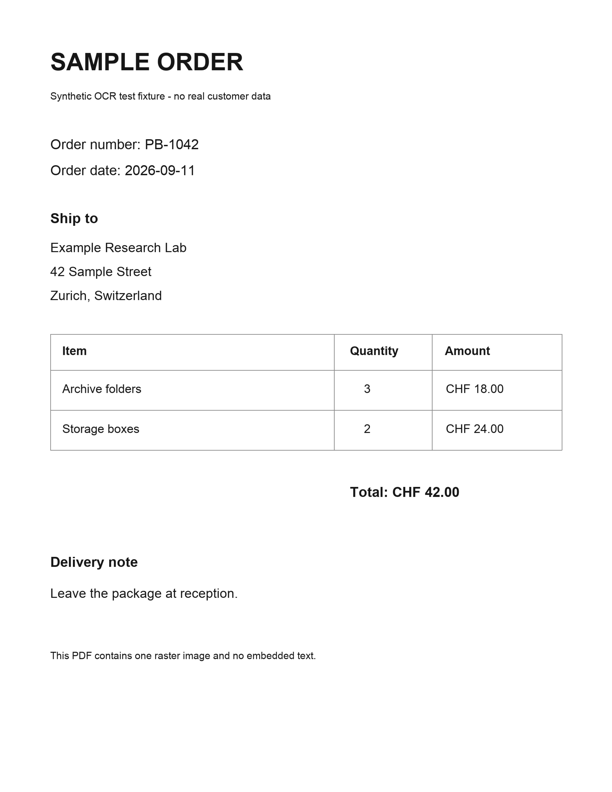
## SAMPLE ORDER

Synthetic OCR test fixture - no real customer data

Order number: PB-1042

Order date: 2026-09-11

## Ship to

Example Research Lab 42 Sample Street Zurich, Switzerland

| Item            |   Quantity | Amount    |
|-----------------|------------|-----------|
| Archive folders |          3 | CHF 18.00 |
| Storage boxes   |          2 | CHF 24.00 |

Total:

CHF 42.00

## Delivery note

Leave the package at reception.

This PDF contains one raster image and no embedded text.
Drag to compare
OCR read the text, the headings came out as ## headings and the item table kept its three columns. Two details differ from the page. The three address lines were joined into one paragraph, and the total label and amount became two paragraphs.
How to convert a PDF to Markdown
- 1
Add your PDF
Paste a public HTTPS link to a PDF or drop a PDF file up to 10 MB into the converter above.
- 2
Wait for page 1
Parsebridge copies the first page and converts it with Docling. Scanned pages take longer because OCR runs.
- 3
Copy the Markdown
Use the Copy button and paste the Markdown into your editor, notes app or prompt.
- 4
Convert the whole file
For every page, call the API with an API key. New accounts get 50 free pages.
Convert whole PDFs and folders with the API
The API runs the same conversion on every page. Send a PDF upload or a public PDF URL, and the JSON response has the Markdown in content.
- PDFs up to 50 MB
- Every page is converted, not just the first.
- 1 page = 1 page of your allowance
- The API returns a 402 error when your remaining pages don't cover the document.
- Upload a file or send a URL
- To send a URL, post
{"url": "..."}to/v1/parse/url.
Keep your API key server-side. See the API docs and the hosted Docling API page for details.
curl -s https://api.parsebridge.com/v1/parse/document \
  -H "Authorization: Bearer $PARSEBRIDGE_API_KEY" \
  -F "file=@report.pdf" \
  | jq -r .content > report.md
Frequently asked questions
Is this PDF to Markdown converter free?
Yes. The converter on this page is free and needs no account. It converts the first page of each PDF, and each IP address can send 5 conversion requests per hour. To convert full documents, create an account. New accounts get 50 free pages as one-time credits, with no credit card. Paid plans start at $17/month for 5,000 pages.
How many pages does the free converter handle?
One. It converts page 1 and shows how many pages the PDF has. Files can be up to 10 MB. The API converts every page of PDFs up to 50 MB, and each page uses one page of your allowance.
Does it work on scanned PDFs?
Yes. If a page draws an image but has little or no embedded text, Parsebridge turns on OCR for the conversion. When no page looks scanned, OCR stays off, so text inside images on otherwise digital pages isn't extracted. The OCR engine and language can't be configured.
How are tables converted?
Docling detects each table and rebuilds its rows and columns, and the Markdown output uses pipe tables. Markdown tables can't express merged cells, so check complex tables in the output. Images are replaced with an <!-- image --> placeholder.
What happens to the PDF I upload?
The converter copies the first page to temporary storage for conversion and deletes it when the request finishes. The Markdown isn't saved. To enforce the hourly limit, Parsebridge records your IP address with a timestamp. See the privacy policy for details.
Which files can I convert?
PDFs only. Word, PowerPoint, HTML and image files aren't supported. Links must be public HTTPS URLs that return the PDF directly.
How do I convert PDF to Markdown in Python?
Call the API with requests as in the example above, or run Docling locally. The Docling Python guide covers installing Docling, tables and OCR.
Convert full PDFs to Markdown
Create an account to get an API key. New accounts start with 50 free pages as one-time credits, with no credit card. Plans start at $17/month for 5,000 pages.
Questions? support@parsebridge.com